


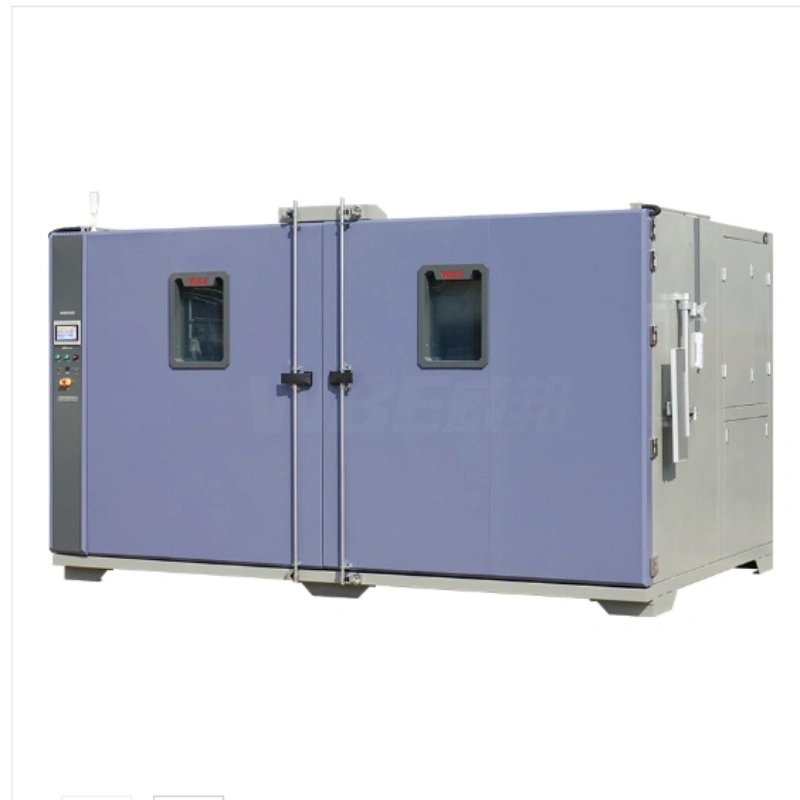
Walk-in environmental chambers keep a large interior uniform by moving air in one deliberate path — supply along the top, return along the bottom — and by placing sensors where the product actually sits rather than where the controller is mounted. Uniformity is not a property of the walls. It is a property of the airflow, the load pattern and the measurement points working together, and any one of the three can break it.
This guide follows the order a commissioning engineer actually works, not the order a spec sheet lists. We will cover five steps in sequence: separating uniformity from fluctuation, how the airflow is organised, where you put the load, where you put the sensors, and what to check when a uniformity result fails. By the end you should be able to look at your own chamber and predict which of those five will be the weak link.
The short version, if you only read this far
- Uniformity (spread between locations) and fluctuation (drift at one location) are two different numbers, and they are often confused.
- Top supply and bottom return create a predictable path that a large cavity cannot get from a single fan and a wide opening.
- Most uniformity failures are loading mistakes, not machine faults — a blocked return path is the usual cause.
- A sensor map beats a single probe every time when you have to defend a result.
Step 1: Separate Uniformity From Fluctuation Before You Test Anything
Two different numbers both get called accuracy, and mixing them up sends you chasing the wrong problem. Uniformity is how much the temperature varies between different locations at the same moment. Fluctuation is how much the temperature at one fixed location moves over time. They are measured differently, they fail for different reasons, and they are fixed in different ways.
| Term | What it measures | Typical figure | What it tells you |
|---|---|---|---|
| Temperature uniformity | Difference between locations at one moment | 1.5 °C or better | Whether the whole room is at the same condition |
| Temperature fluctuation | Movement at one location over time | ±0.3 °C or better | Whether control holds steady once stabilised |
| Humidity uniformity | Difference between locations at one moment | better than 3.0% RH | Whether moisture is distributed evenly |
| Humidity fluctuation | Movement at one location over time | ±2.0% RH or better | Whether humidity control holds during a dwell |
Here is why the distinction matters in practice. A chamber can hold a rock steady setpoint at its control sensor and still fail uniformity, because the control sensor only knows its own corner. It can also show a perfect corner-to-corner spread while slowly drifting over the day, because a survey only takes a snapshot. You need both numbers, taken at the same time, before you can say anything about the room.
Once that distinction is clear, the next question is physical: how does air move through a volume this large in the first place?
Step 2: How the Airflow in Walk-In Environmental Chambers Is Organised
In a large cavity, airflow layout — not refrigeration power — decides uniformity. You can fit a bigger compressor and still have a room with a warm corner, because the heat is being removed but the air is not being distributed. The layout is what carries the conditioned air to every position in the volume.
The most reliable pattern we use is top supply and bottom return. Conditioned air enters along the ceiling and settles down through the working volume, while the return path runs along the floor and pulls air back to the conditioning unit. Because warm air rises and cool air falls, this arrangement works with natural convection rather than fighting it, so the whole room gets a gentle downward sweep instead of a single jet.
- Ducting and a static pressure box spread the supply across the ceiling, so no single nozzle dominates one column of air and starves the rest.
- A modular refrigeration design with multiple supply paths suits a big room, because one air path simply cannot serve a volume of that size with one temperature.
- AB and ABC room configurations let you zone the working space, so each zone follows the supply and return pattern instead of sitting in a dead corner.
- Double doors and an entry ramp keep the loading event short, and a bottom secondary drainage path keeps condensate off the floor path where the air returns.
Two things follow from this. First, the effect of any obstruction near the supply or the return is larger here than in a bench chamber, because the path is longer and there is less turbulence to even things out. Second, humidity uniformity rides along with temperature uniformity, because moisture is carried by the same air. Get the airflow right and both numbers tend to fall into place together.
A well-designed airflow still only works if you leave it room to move, which brings us to the part most people get wrong.
Step 3: Where You Put the Load
Most uniformity failures we get called about are loading mistakes, not machine faults. The chamber is fine when empty. It only drifts when a full batch goes in, because the load has quietly blocked the path the air was using.
- Keep a clear gap between the load and the return grille. Never stack product flat against the floor return, because that is the single fastest way to break uniformity.
- Leave space between shelves and between the load and the walls so air can move vertically as well as horizontally.
- Do not build a solid wall of product directly under a supply outlet. Break dense batches into columns so the air can weave between them.
- Keep the largest thermal mass away from the door, so the part that recovers slowest is not also the part that feels every door opening.
- Use carts that leave the floor path open underneath, rather than solid-based trolleys that seal off the return channel.
A simple rule we give customers: if you can stand at the door and see through the batch from front to back, the air can too. If the load looks like a wall, the air sees a wall as well. For layouts built around large or heavy items, our walk-in high and low temperature wet heat chamber is arranged so the racking and the return path can be planned together. Where the parts themselves need added protection — a battery pack or a module, for instance — the explosion proof battery walk-in chamber keeps the same airflow logic with the safety provision built in.
Load placement controls where the air goes. Sensor placement controls whether you find out about it, which is the next step.
Step 4: Where You Put the Sensors
A single sensor tells you what one point did. Uniformity needs a map. That is the plain reason a chamber can pass its own controller check and still fail a customer survey — the two are not measuring the same thing.
- Place reference probes at representative positions — the corners of the working volume, the centre, and any spot where a part will actually sit. Those are the points you are really defending.
- Run an empty-chamber survey first, so you know the machine on its own, then repeat it with the real load in place. The loaded survey is the one that matters.
- Log every probe on the same clock. Staggered timestamps turn a clean uniformity figure into an argument you cannot win.
- Keep the probes away from the supply outlets and the return grille. A probe sitting in the supply stream will read an optimistic number that no part will ever see.
The gap between an empty survey and a loaded survey is the honest measure of your margin. If a customer needs a 20% to 98% RH humid run, the load has to be tested at that humidity, not only at ambient, and the same applies when temperature and humidity are combined in one profile — the WBE-YG6500L combined walk-in chamber is the platform most of those programs use. Machines built for the full humidity range are covered on our walk-in environmental test chamber range, which lists the humidity and room options model by model. Aerospace programs, which often run witness tests, add the further requirement that the sensor map be explainable to someone who did not commission the room; the aerospace industry solutions page walks through how that is usually set up.
Once you have a loaded map, you have a baseline. The next question is what to do when a later run falls outside it.
Step 5: What to Check When Uniformity Is Out of Spec
Work the list in order, cheapest fix first. Nine times out of ten the answer is not a failed compressor, and starting with the expensive hypothesis wastes a day of testing you did not need to lose.
- Re-check your reference probe placement and calibration before you touch the machine. A probe that has drifted is far more common than a machine that has.
- Look at the load pattern. Is the return path blocked, is the stack too tall, is anything pressed against the wall or the ceiling outlet?
- Check door seals and door-open time. A worn gasket or a session full of small door openings will pull one side of the room off setpoint.
- Confirm the supply duct and the airflow path are clear of fixture hardware, cable runs and staging carts left inside the room.
- Verify that all modular refrigeration units are running and balanced. One unit lagging shows up first as a corner that will not hold.
- Only after the first five checks come back clean, book a requalification with a reference survey and compare it against your loaded baseline.
That sequence resolves almost every case we see in the field, and it usually lands on items one and two. If your result still moves, the chamber may genuinely need a rebalance — but you will know that only after the cheap checks have cleared.
Frequently Asked Questions
Is 1.5 °C uniformity good enough for most standards?
For many climatic and thermal cycle test plans, yes — a spread of 1.5 °C across the working volume sits comfortably inside the tolerance bands those documents allow. The important part is not the headline figure but that you can demonstrate it with the load in place, at the corners of the space your parts occupy.
Why does my chamber only fail uniformity when it is full?
Because a full load changes the airflow path. Product blocks the return, dense assemblies hold their own heat, and fixtures shield parts of the volume from the supply. The chamber is behaving correctly; the air is simply reaching the room through a different route than the one it was surveyed on.
How many sensors do I need for a walk-in chamber?
Enough to cover the corners, the centre and each position a real part will occupy. There is no fixed number, but the guiding principle is that every point you might be asked to defend should be measured at least once during qualification, and the busiest points should stay logged on every run.
Does humidity uniformity follow temperature uniformity?
Closely, because moisture travels on the same air you are already circulating. If the temperature is uniform, humidity usually is too. Where the two diverge, the cause is often a cold surface somewhere in the room where moisture condenses, which is exactly why top supply, bottom return and a secondary drainage path matter.
Walk-in environmental chambers that hold uniformity are not magic, and they are not simply bigger bench chambers. They are rooms where the airflow was planned in one direction, the load was placed so the air could pass, and the sensors were put where the product actually lives. Get those three right, and a 1.5 °C spread across a room becomes something you can reproduce on any day, not something you hope for. The regular checks behind that confidence are covered in our maintenance and calibration notes.
Map the airflow before you commit the load
Tell us your working volume, your load pattern and the conditions you run, and we will show you where to position sensors and how to zone the racks.
Review walk-in chamber specs Ask about airflow zoning